A construction daily report gives the next shift, the project manager, and the office the same record of what happened on site. Download the Excel workbook and choose the worksheet that matches the information you need to capture today. The five tabs cover a superintendent’s daily field report, labor and equipment hours, weather delays, deliveries and inspections, and a weekly progress rollup. Each tab includes a completed example below the blank entry area.
The superintendent download also includes a shift handoff for unresolved issues, with an owner, due time, evidence reference and open-item count.
Choose a template
- Superintendent Daily Report
- Labor and Equipment Log
- Weather and Delay Record
- Delivery and Inspection Log
- Weekly Progress Rollup
Template previews and downloads
Each preview shows an example completed in Excel. The corresponding download has a working area ready for your own entries.
Superintendent Daily Report
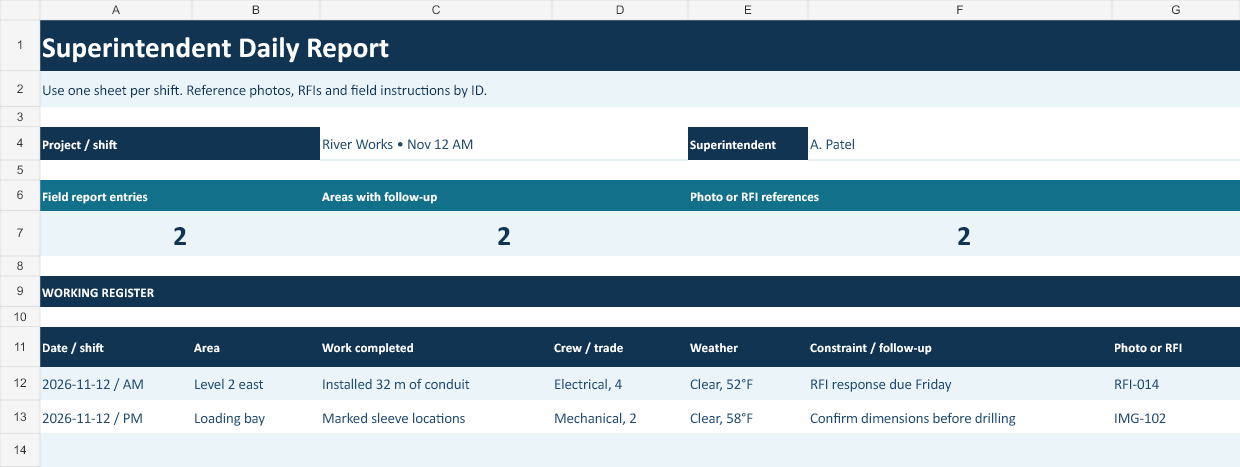
Use this sheet as the shift handoff. Put each work area on its own row and write a short description of the work the incoming supervisor can verify. The navy layout keeps the work location and next action prominent. If a note applies to several areas, repeat the reference number so the office can find the source from either row.
The overview totals update as you enter rows, so the person preparing it can check the number of entries, follow-ups or supporting records before sending the report.
Download Superintendent Daily Report (.xlsx)
Labor and Equipment Log
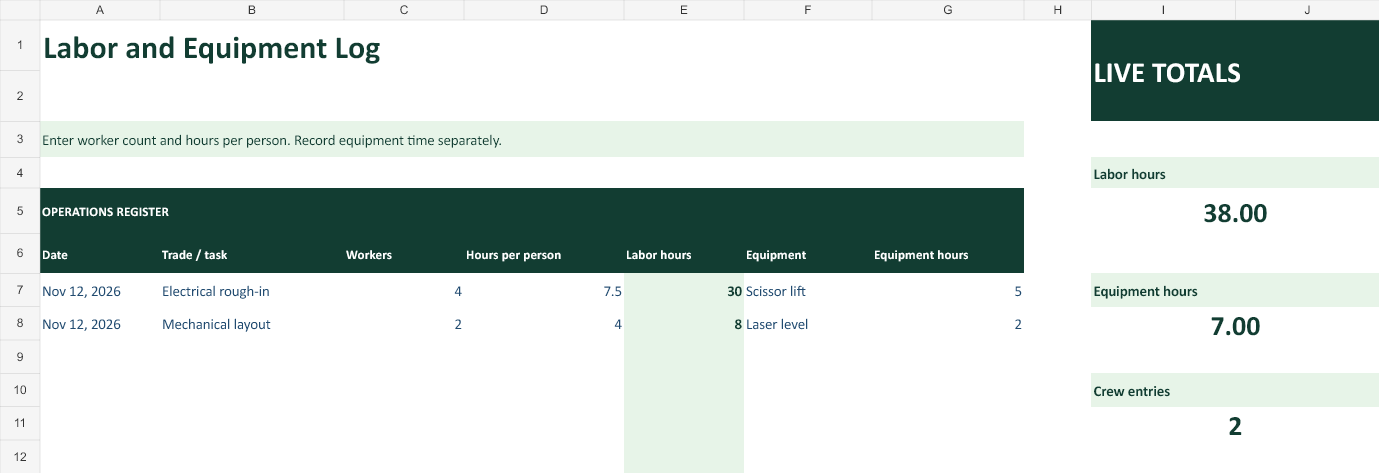
The green time log multiplies headcount by hours per person to calculate labor hours. Use separate rows when a worker transfers between tasks or leaves early. Enter equipment hours only for the piece of equipment named on that row. A rented lift may have a full day on the ticket and five hours of use in the field.
The side panel leaves the register in view while totals update. Use it during a review to check the running figures without scrolling to the bottom of the sheet.
Download Labor and Equipment Log (.xlsx)
Weather and Delay Record
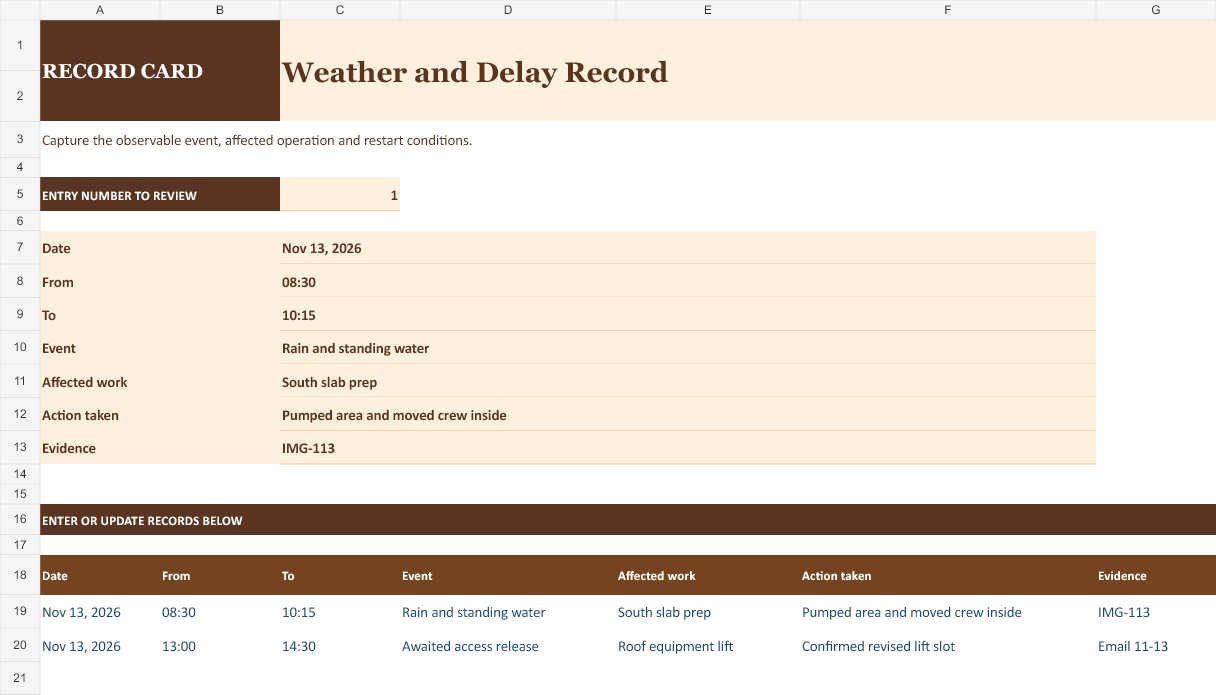
The amber delay record keeps start and stop times beside the affected work and the action taken. Record the actual observation, such as standing water, and identify the task that paused. For a prolonged event that carries into the next shift, start a new dated row and reference the prior shift’s entry.
Choose the entry number at the top to see a vertical record card. It displays that row from the register below and is useful when you want to review one record at a time.
Download Weather and Delay Record (.xlsx)
Delivery and Inspection Log
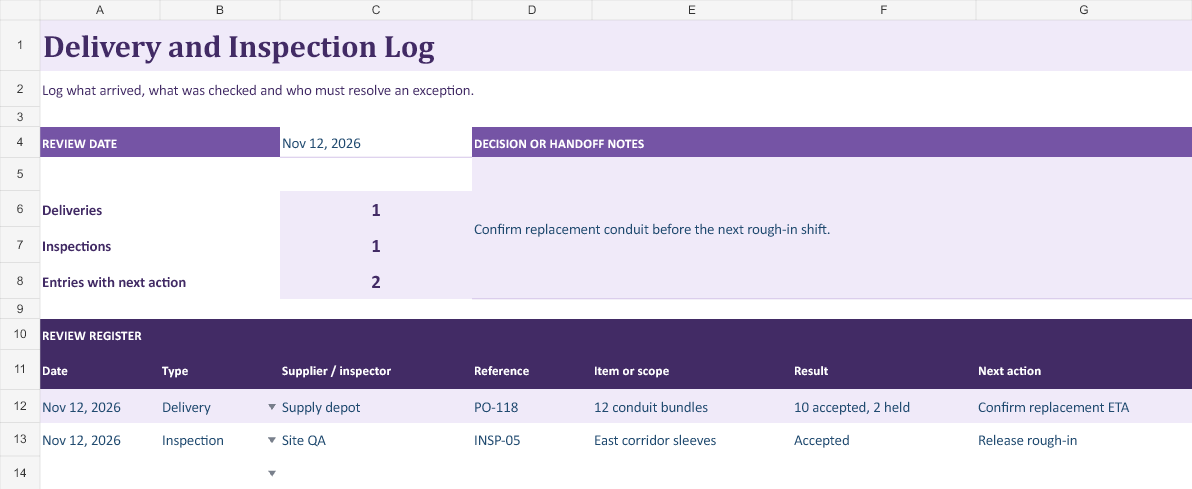
The plum delivery and inspection log makes it easy to find an open hold by its reference number. If a shipment has multiple purchase orders or only part of the load is accepted, document each result distinctly. When the issue is resolved, date the release and preserve the original exception.
The review panel keeps the key counts beside a dedicated handoff note. Record the review date and the next decision before sharing the register.
Download Delivery and Inspection Log (.xlsx)
Weekly Progress Rollup
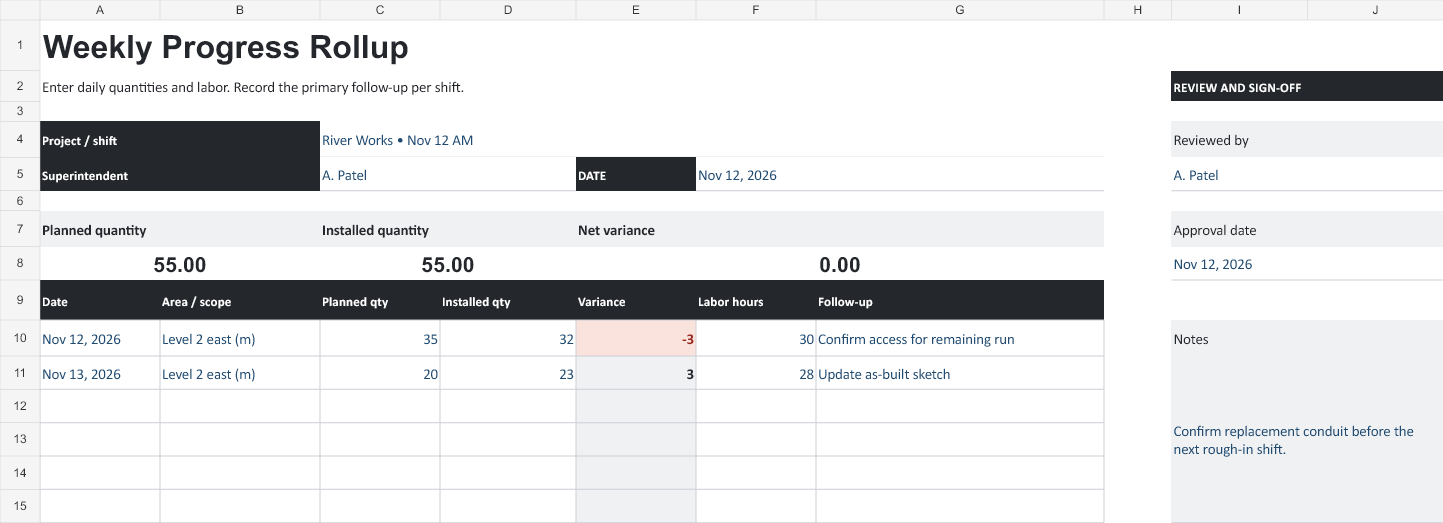
The graphite weekly rollup calculates installed quantity minus planned quantity on each row. Use it as a meeting worksheet for one work package or keep the unit in every scope label. Record the reason for the variance and what has to happen before the next shift can recover the shortfall.
The monochrome version has labeled reference fields, a live summary and a separate review panel for recording sign-off.
Download Weekly Progress Rollup (.xlsx)
Download the complete collection
Get all five templates in a single Excel workbook if you use several of these worksheets together.
Download all five templates (.xlsx)
Which construction daily log should you use?
Start with the superintendent daily report when one person needs to summarize the whole jobsite. Use the labor and equipment log if the main question is how much time went into a specific task. Choose the weather and delay record when work was stopped, resequenced, or held for access. The delivery and inspection log is useful when materials need to be accepted, held, or released before the next trade starts. The weekly progress rollup helps you compare quantities planned and installed, provided the entries use the same scope and unit.
On a small renovation, one superintendent report and a few photos may cover a routine day. On a larger site, each trade can submit its hours and the superintendent can carry forward only the issues that affect tomorrow’s work. When two crews work in the same area, identify each crew and its operation. A combined note such as “rough-in continued” leaves the next supervisor guessing which part of the building is ready.
How to fill out a construction daily report
Start with the project name, report date, shift and preparer. Save one copy per project and shift if your records are shared by file. Name the copy using the date and project or area, so a project manager can retrieve it later without opening a folder of identically named reports. Use a consistent zone, floor, room or station reference that matches the drawings and schedule.
Record completed work with a quantity and unit whenever the crew can verify both. For example, write “installed 32 m of conduit in Level 2 east corridor” and add the sheet reference if the route matters. If that number is provisional, label it as an estimate and update it at the next measurement. Separately list work that is ready for inspection, work accepted by an inspector, and work still in progress. The difference matters to the trade waiting to cover it.
Capture exceptions as they occur. Record the time, what you observed, the operation affected and what the crew did next. If you moved workers to another area, record the alternate activity and the time spent there. Add a photo ID, delivery ticket, inspection reference or RFI number where it helps the office locate the supporting record. Before sending the report, give each carry-forward item a person and an expected follow-up time.
Completed example for a superintendent shift
On November 12, the electrical crew installed 32 m of conduit in the east corridor. Four workers spent 7.5 hours each on that activity, giving 30 labor hours. The scissor lift operated for five hours. The report records the lift hours in a separate field because equipment usage and worker time are measured independently. If one person joined for only four hours, record that person on a separate line so the headcount calculation remains accurate.
The delivery log shows 12 conduit bundles arriving under PO-118. Ten were accepted and two were held for review. That distinction tells procurement how many bundles the crew can issue. In the superintendent report, enter the exception and assign a follow-up to confirm the replacement date. Attach or reference a photo of the affected bundles and label the delivery ticket with the same purchase order number.
The weekly rollup shows 35 m planned and 32 m installed for the shift, a variance of −3 m. The next day the crew installs 23 m against a 20 m plan, recovering the difference for that scope. Compare totals only after confirming the rows refer to the same work package, unit and reporting period. If the plan changed, retain the original target and explain the approved change in the follow-up notes.
How to document weather, delays and site instructions
Record conditions when they affected the activity. For rain, the useful detail may be standing water at the south slab, the time the crew stopped preparing the area, and when the surface was ready to inspect again. For heat or wind, note the affected operation, relevant readings and the decision taken by the person directing the work. A local forecast can help with planning the next shift, while the daily report preserves the conditions the crew actually encountered.
Distinguish a delivery hold, missing access, an unresolved drawing question and a weather stoppage. If two events overlap, keep their actual time ranges. Adding both durations without reviewing the overlap can double-count time. For a changed instruction, write who issued it, when it was received and the drawing or email reference. Use the project’s normal approval process for a change in scope, with the daily log serving as the dated account of what happened.
Daily reporting checklist before sending
Check the report date and shift against the crew time records. Confirm whether every quantity is installed, delivered, inspected or merely planned. Look for missing units, empty locations and names that are too vague for someone outside the crew. Verify that referenced photos open and that a person unfamiliar with the site can identify the location. Assign the next step for any blocked work, material hold or outstanding inspection.
Share the report on the agreed cadence while the shift is still fresh. If you correct a submitted report, keep the original and label the correction with its date and reason. For a paper copy, use Excel’s print preview and select the entry area you need. A landscape page usually leaves more room for notes, and repeating the header row on a long log makes continuation pages easier to read.
Frequently asked questions
What belongs in a superintendent’s daily report?
Record the shift, work area, trade, and measurable progress. Note delays, inspections, deliveries, and decisions that affect the next shift. Give open items an owner and a due time in the shift handoff so the incoming supervisor can act on them.
How do I calculate labor hours when crew members work different shifts?
Group workers who spent the same number of hours on the same activity. Four workers at 7.5 hours each contribute 30 labor hours. Enter a worker who spent only four hours on that activity on a separate line. Record equipment hours in their own column.
What should I write when weather stops only part of the work?
Use the Weather and Delay Record to name the activity affected, when it stopped, the conditions observed, and any alternate work the crew took on. If two delays overlap, preserve both time ranges and check the overlap before reporting total lost time.
How do I report a delivery that was only partly accepted?
Enter the purchase order reference and distinguish the quantities received, accepted, and held. If 12 bundles arrived and two were held, note that ten are available for use. Assign someone to confirm the replacement date and link the delivery ticket or photo.
Can I combine quantities from different trades in the weekly rollup?
Compare planned and installed quantities for matching scopes and units. Keep meters of conduit separate from counts of fixtures. If the approved plan changes, record the original target and reference the revision so the variance remains understandable.
How do I correct a daily report after sharing it?
Save a dated correction that identifies the original report, what changed, and why. If the correction affects an inspection release, crew hours, or an open handoff item, notify the people relying on that entry through the project’s usual reporting channel.