
A car show registration form connects each entrant with a vehicle, entry class, payment record, and arrival plan. Collect those details consistently before the event so volunteers can check vehicles in without asking drivers to repeat information at the gate.
2 New Editable Templates with Previews
Choose a layout for the task you need to complete. Each preview shows the actual editable Word and Excel file. Download the template and replace the placeholders or example inputs with your own details.
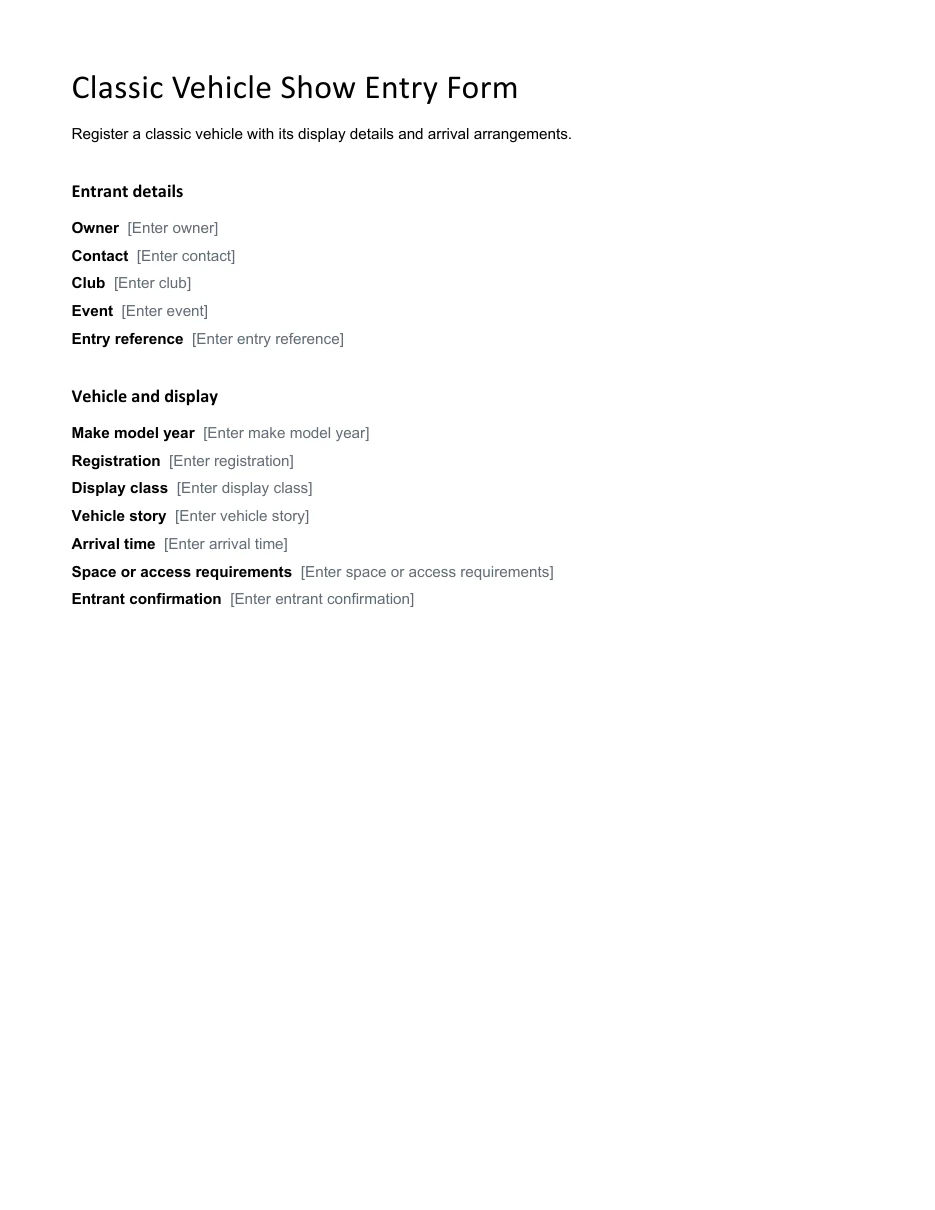
Classic Vehicle Show Entry Form
Register a classic vehicle with its display details and arrival arrangements.
Download Editable Word Template
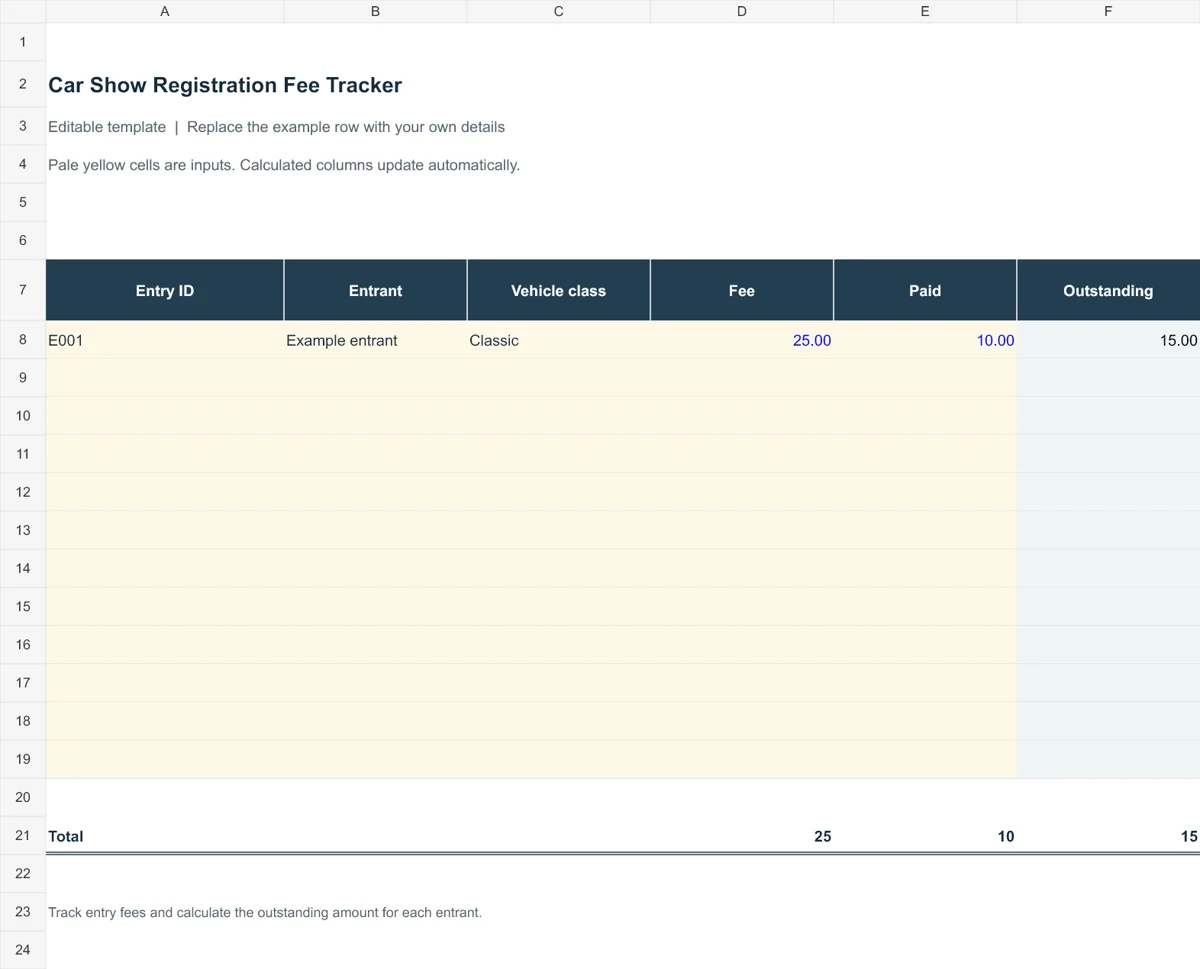
Car Show Registration Fee Tracker
Track entry fees and calculate the outstanding amount for each entrant.
The templates below suit advance entries and show-day registration. Decide how you will assign entry numbers, handle a change of vehicle, and separate a submitted form from a confirmed place. A simple record of class, fee status, and confirmation date will help the registration desk and judging team work from the same information.
Go to the two editable templates and preview images and read the practical guidance below.
What Is a Car Show Registration Form?
A car show registration form is a document that collects information about each participant and their vehicle before an event. Organizers use it to plan parking, judging classes, and safety. Entrants fill it out to confirm their place and agree to the event rules.
Car shows are held by clubs, dealers, charities, and local communities. They let enthusiasts show off classic, custom, or unique vehicles and let visitors enjoy them up close. A good form makes registration quick for everyone involved.
A vehicle condition report can document condition separately when an organizer needs a vehicle handover record.
Why Use a Registration Form Template?
Building a form from scratch takes time, and it is easy to forget key details. A template helps because it:
- Saves time. You only need to update the event name, date, location, and fees.
- Reduces missing information. Every entrant provides the same essential details.
- Helps with planning. Organizers can sort vehicles by class, year, or make and plan space accordingly.
- Protects the event. A built-in liability waiver and rules section sets clear expectations.
- Works in print or online. Hand out copies at the venue or share a digital version.
If collecting entry fees, provide a payment receipt that identifies the entrant and event.
What to Include on a Car Show Registration Form
Most successful forms cover the following:
- Event name, date, time, and location
- Entrant name, address, phone number, and email
- Vehicle year, make, model, color, and license plate
- Vehicle class or category, such as classic, muscle, truck, or motorcycle
- Club or organization name, if any
- Registration fee and payment method
- Liability waiver and release with signature and date
- Show rules, arrival time, and contact person for questions
Note: Have a local professional review any liability waiver before you use it at a public event, since requirements vary by location.
Use a sign-in sheet at the entrance to reconcile arrivals with the advance registrations.
2 Editable Templates with Direct Downloads
Choose one of the two layouts below to suit your needs. Each preview shows the actual editable file, which you can download directly.
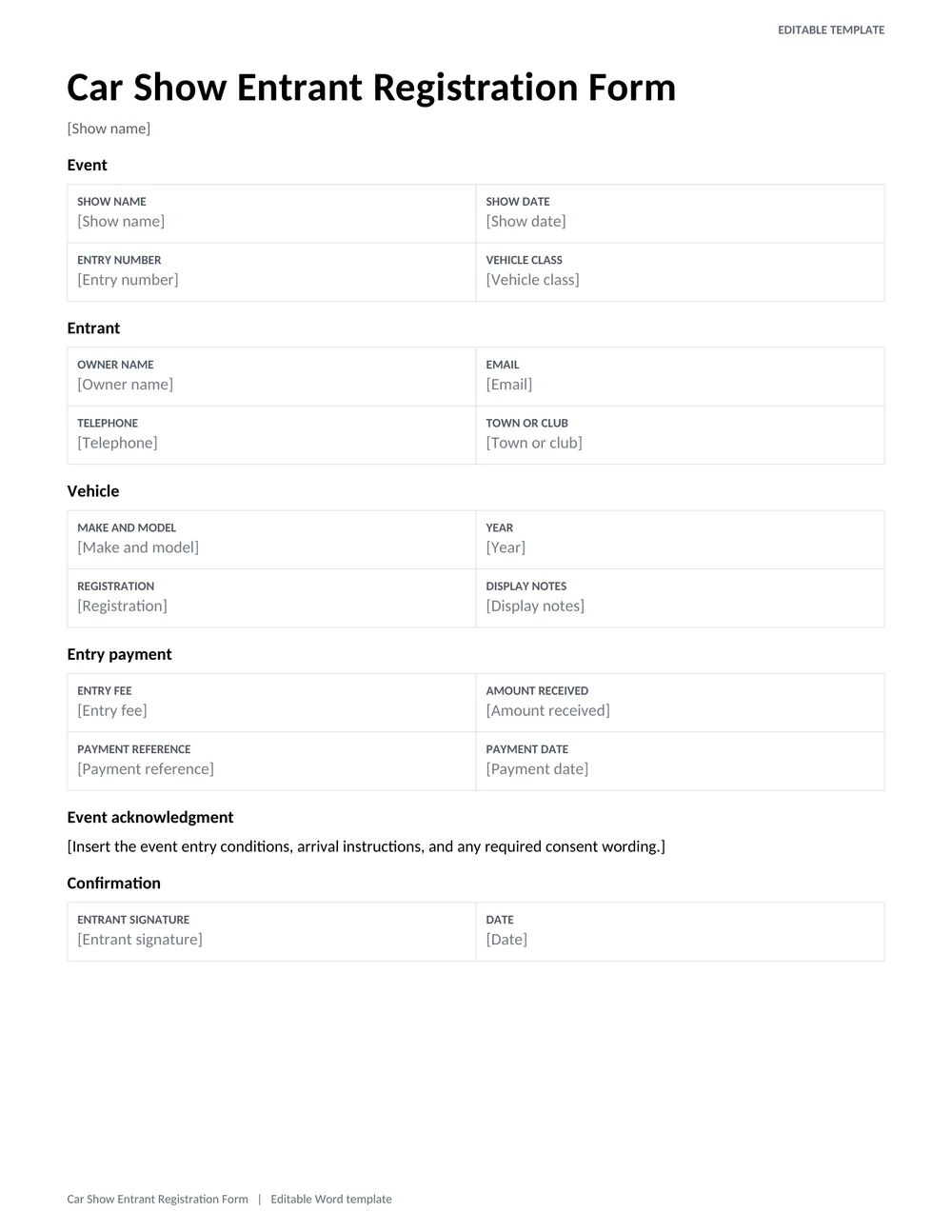
Car Show Entrant Registration Form
A printable single-entry form with owner contact details, vehicle class, display information, entry fee, and event acknowledgment.
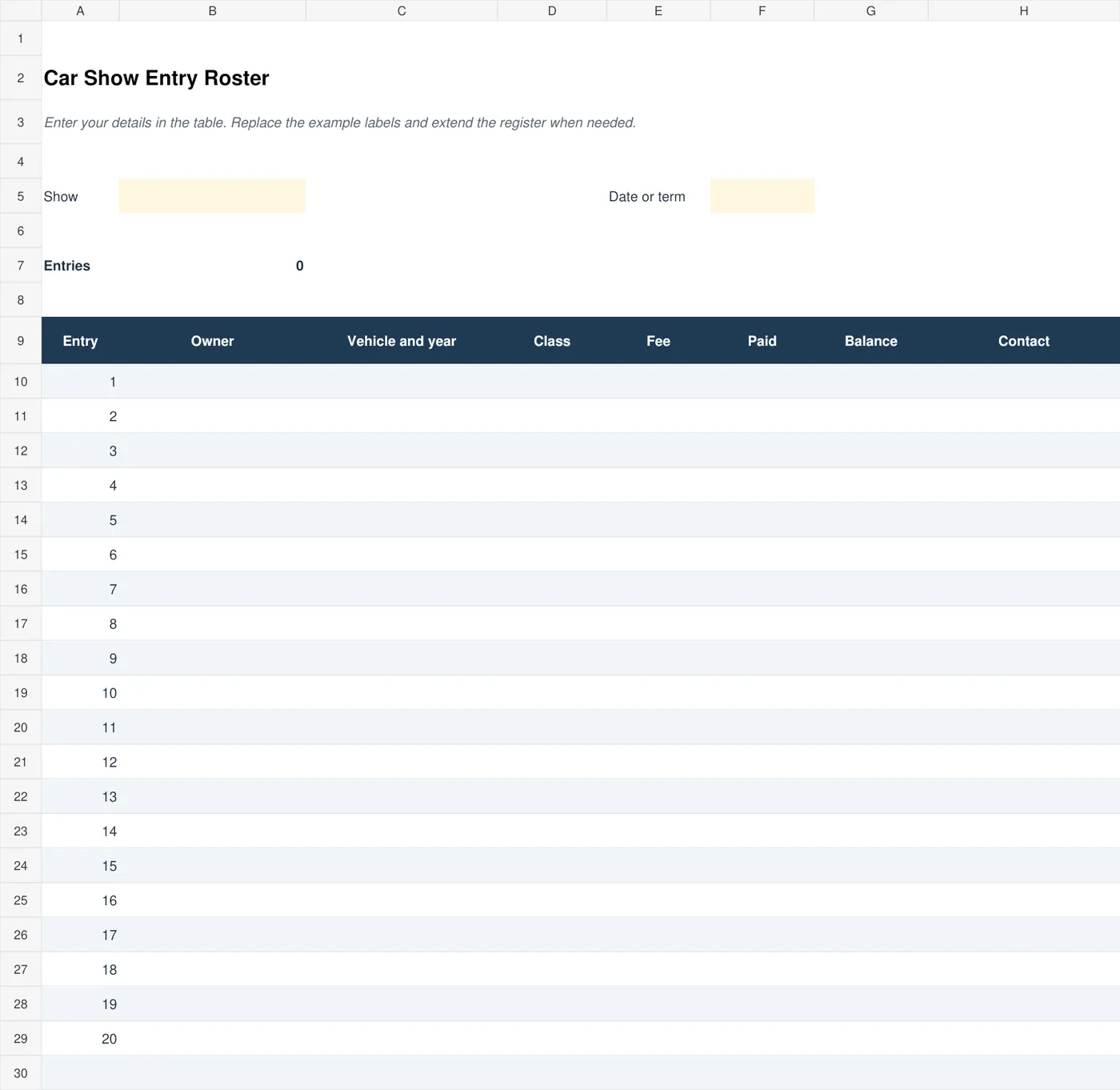
Car Show Entry Roster
Manage multiple show entries, vehicle classes, entry fees, payments, and outstanding balances in one Excel register.
Types of Car Show Registration Forms
Depending on your event, you might choose one of these formats:
- Pre-registration form: Sent in advance, often with a lower entry fee and guaranteed spot.
- Day-of registration form: Filled out at the gate for last-minute entrants.
- Class-based form: Lets entrants choose a judging category such as antique, street rod, or modified.
- Charity show form: Includes donation information and sponsor details.
- Spectator and vendor forms: Separate forms for booths, food trucks, and club displays.
How to Use a Car Show Registration Form
- Pick a template that fits your event size and style.
- Replace the placeholder text with your event name, date, location, and contact details.
- Add your entry fees, classes, and payment instructions.
- Include a waiver and the basic show rules.
- Print copies or publish the form on your website, blog, or social media pages.
- Collect completed forms and organize them by class to plan parking and judging.
Planning Registration From Entry to Show-Day Check-In
A car show registration form should support the event you are actually running. A judged show needs vehicle classes, judging references, and eligibility information. A casual display may only need the entrant’s name, vehicle description, space requirements, and arrival details. Decide which entries the organizing team will use before adding extra questions. A shorter form with clear instructions is easier to complete and easier for volunteers to process accurately.
Keep the entrant form and the master entry roster connected through a unique entry number. The form records what one participant submitted; the roster lets organizers manage all participants together. For example, entry CS024 should refer to the same owner and vehicle in both records. Do not use a vehicle’s position in a spreadsheet as its permanent identity, because sorting the list can change the row number.
Set out the registration stages clearly. An application can be received without being confirmed, especially when class capacity or payment still needs checking. Use distinct statuses such as received, awaiting payment, confirmed, and cancelled. If participants can register more than one vehicle, explain whether each vehicle needs its own form and fee. This prevents an organizer from discovering on arrival that one payment was intended to cover several spaces.
Consider the information needed at the gate. Volunteers may need the entrant’s name, entry number, class, and arrival instructions, but they rarely need every detail held in the registration file. Prepare a suitable check-in list rather than handing out the full contact database. Keep personal phone numbers and payment information within the group responsible for administering entries.
Handling Classes, Payments, and Last-Minute Changes
Suppose an event offers 25 spaces for classic cars and 15 for modified vehicles. A registration form can ask the owner to select a preferred class, while the organizer confirms the final assignment. State how uncertain entries will be handled. If a vehicle could fit more than one description, record the organizer’s decision and notify the entrant instead of leaving different volunteers to make conflicting choices on show day.
The Excel entry roster above includes fee and payment fields so the remaining balance can be checked. Enter the agreed entry charge separately from the amount actually received. A confirmed entry with an unpaid balance is different from a fully paid entry, even if both vehicles have a reserved space. Record a payment reference appropriate to the event’s process without collecting full card details on a general-purpose form.
For example, if the entry charge is 30 and an entrant pays 20 in advance, the balance is 10 in the same currency. If a later discount is approved, update the charge and retain the reason in the administrative record. Do not enter a discount as an unexplained payment. The roster should show whether money was received, a charge was reduced, or a refund was made.
Publish a clear contact route for changes to vehicle details, arrival plans, or cancellations. When an owner substitutes a different car, update the relevant entry and reassess the class or space requirements if needed. Keep a dated change note so the check-in team does not rely on an outdated printed list. For a large event, issue one agreed final version of the roster to the volunteers responsible for arrivals.
Before opening registration, test the form with someone who has not helped design it. Ask them to register a typical vehicle, then check whether the team can assign a class, confirm the fee, and produce a usable check-in entry from the answers. Correct confusing wording before collecting real entries. This small trial often reveals problems that are difficult to spot when reading an empty template.
Tips for a Smooth Registration Process
- Set a clear registration deadline and post it on the form.
- Offer both print and online options to reach more people.
- Ask for a mobile number so you can send updates on show day.
- Number each entry so judging and awards stay organized.
- Keep a checklist of received fees and signed waivers.
- Send a confirmation message with arrival times and directions.
A well-designed registration form is the first step to a well-run car show. Pick one of the 2 templates above, customize it with your event details, and start collecting entries. Clear information for entrants and organized data for you means less stress on show day and more time to enjoy the cars.
Frequently Asked Questions (FAQs)
What is a car show registration form?
It is a form that collects details about each participant and their vehicle so organizers can plan the event. It usually includes contact information, vehicle details, fees, and a waiver.
What information do I need to enter a car show?
Expect to provide your name, contact details, vehicle year, make, model, and class, plus a signature on the waiver. Some shows also ask for insurance information.
Can I edit these templates?
Yes. Use each sample as a guide, and change the event name, date, fees, and contact details to suit your show.
Should a registration form include a waiver?
Most organizers include a liability waiver so participants acknowledge the risks and rules. It is wise to have it reviewed by a legal professional in your area.
How much should a car show entry fee be?
Fees vary widely. Small local shows often charge a modest amount per vehicle, while larger events charge more. Charity shows may donate the proceeds.
Can I share the form online?
Yes. You can print it, post it on your website or blog, or share it through social media and email.
How far ahead should registration open?
Opening registration several weeks before the event gives entrants time to plan and helps you estimate attendance and space needs.
How should an entrant register two vehicles?
Create a separate vehicle entry and entry number for each vehicle, even if the owner details are shared. Link the entries to the same payment where appropriate, and confirm how entry fees and class assignments apply to each vehicle.


You must be logged in to post a comment.