Attendance is only useful when everyone records it the same way. These attendance sheet templates help teachers, supervisors, and event organizers record names, dates, and attendance status without rebuilding a register for each session. Choose a group register for a single meeting or a monthly tracker when you need to follow one person’s attendance over time.
2 New Editable Templates with Previews
Choose a layout for the task you need to complete. Each preview shows the actual editable Excel file. Download the template and replace the placeholders or example inputs with your own details.
Weekly Class Attendance Register
Mark attendance across five sessions and calculate each learner’s present count. P present, A absent, L late, E excused. The count includes P only; review late attendance separately.
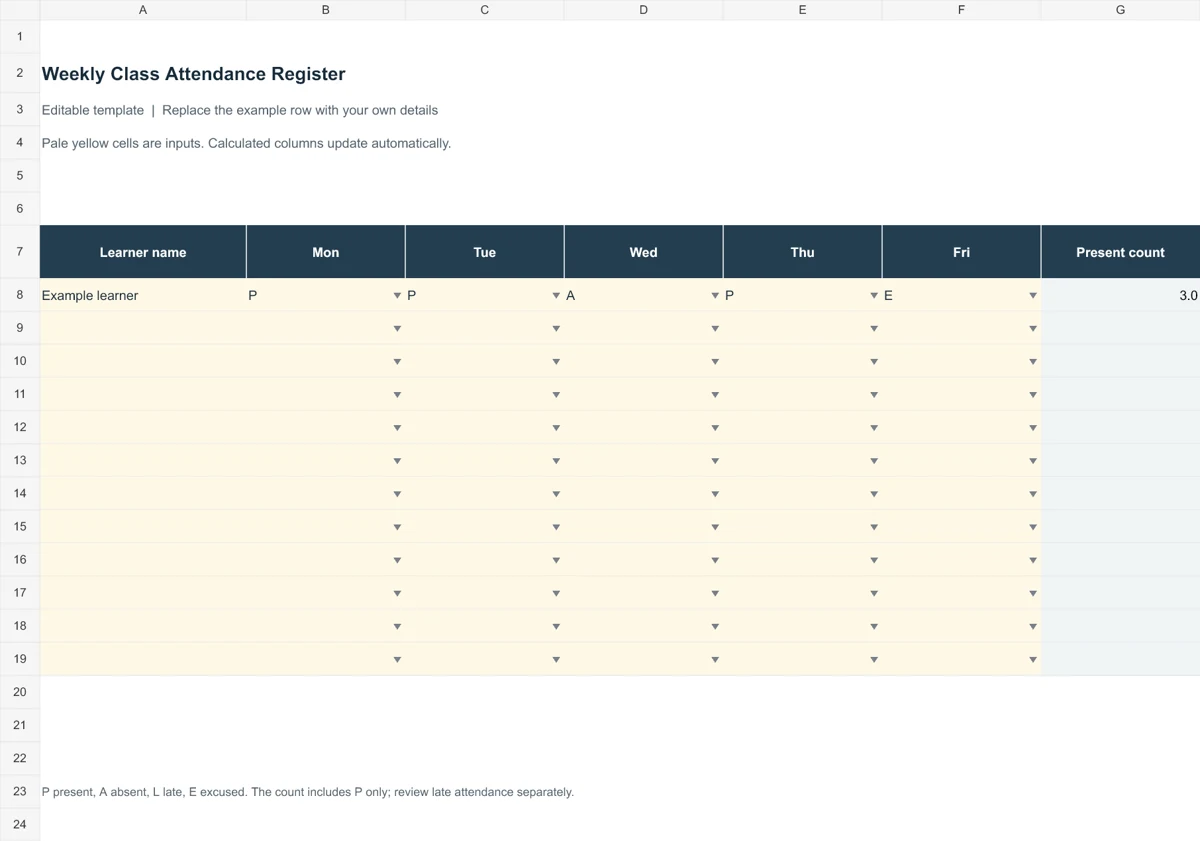
Download Editable Excel Template
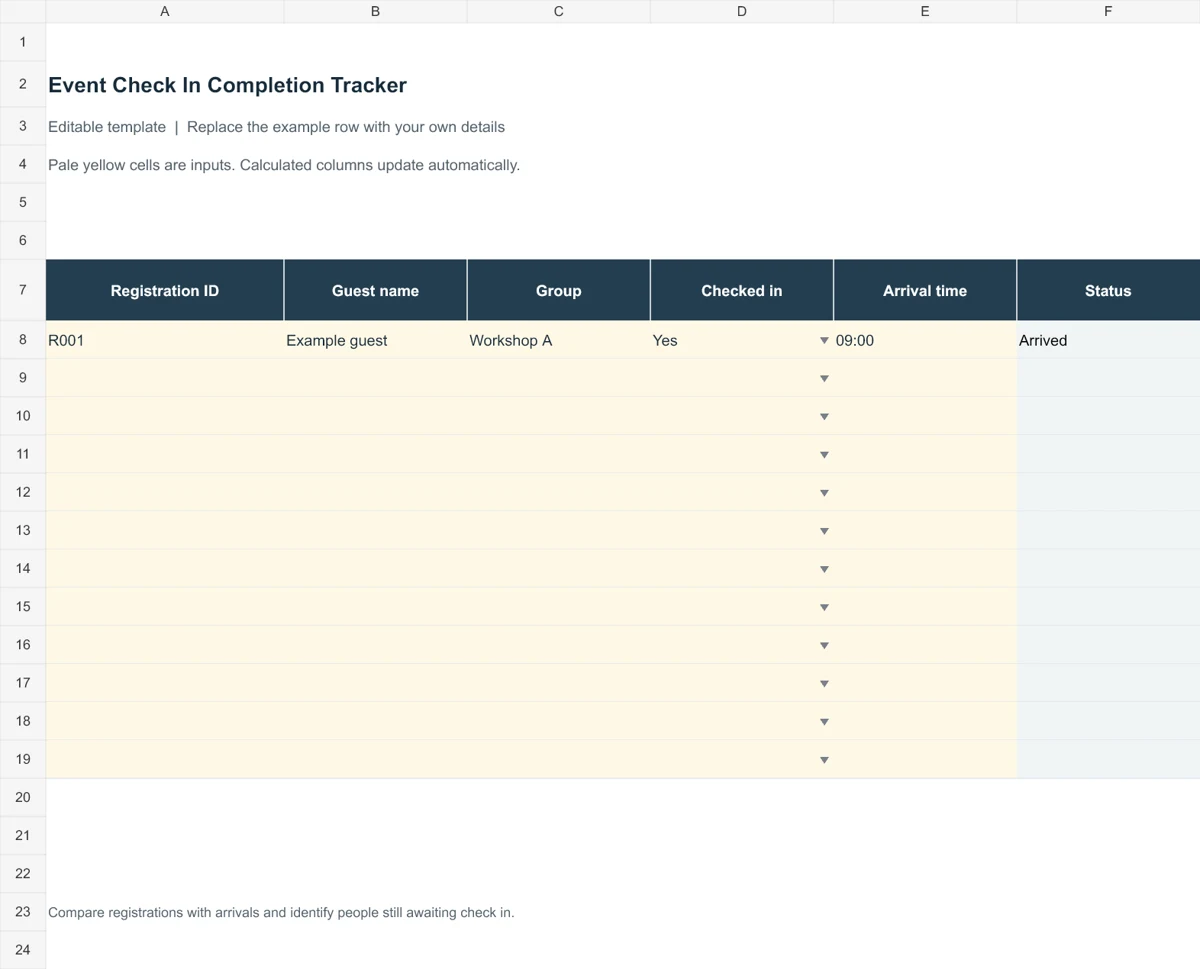
Event Check In Completion Tracker
Compare registrations with arrivals and identify people still awaiting check in.
Before entering names, decide how you will mark late arrivals, excused absences, and sessions that have not yet taken place. Those choices affect the totals and the attendance percentage. The guide below explains the differences, including a worked calculation, so the completed record is easier to interpret.
Go to the two editable templates and preview images and read the practical guidance below.
What Is an Attendance Sheet?
An attendance sheet is a document used to track the participation of people in a class, seminar, meeting, workshop or workplace. It is usually prepared by a teacher, supervisor, meeting organizer or group leader, who marks each person as present, absent or late. Over time, the sheet also reveals attendance habits, such as who is always on time and who frequently misses sessions.
Spreadsheet software such as Microsoft Excel is a popular choice for making attendance sheets because it is easy to customize, can count totals with simple formulas and prints cleanly. Many of the templates below can also be used as printable forms.
Why Attendance Tracking Matters
Keeping accurate attendance records is important in nearly every setting. Some of the main benefits include:
- Accountability: People are more likely to arrive on time when attendance is recorded.
- Payroll accuracy: Companies use attendance sheets to note working hours and presence, which helps the accounting team calculate wages and salaries correctly.
- Academic monitoring: Teachers can spot late arrivals, recognize students with excellent punctuality and follow up on frequent absences.
- Event records: Corporate events, business meetings and conferences need a complete list of attendees for reporting and follow-up.
- Compliance: Schools, training providers and some employers must keep attendance records for a set period.
When payroll depends on hours rather than days present, keep employee timesheets alongside the attendance record.
What to Include in an Attendance Sheet
A useful attendance sheet does not need to be complicated, but it should cover the basics. Consider including:
- The name of the class, department, meeting or event.
- The date, or a row of dates for a weekly or monthly sheet.
- A numbered list of names, and an ID number if you have one.
- Columns to mark present, absent, late or excused.
- Arrival and departure times, if hours matter.
- A signature column for sign-in sheets.
- A totals row or column to count days present and absent.
- A notes section for reasons for absence or special comments.
For arrivals at a one-off event, use a sign-in sheet so participants can enter their own names.
Types of Attendance Sheets
The right layout depends on how you use it. These are the most common types:
- Class attendance sheet: Lists students down the side and dates across the top, so a teacher can mark each day quickly.
- Employee attendance sheet: Records daily presence, time in and time out, leave and overtime.
- Meeting attendance sheet: A short sign-in list with name, title and signature for one session.
- Workshop or training attendance sheet: Tracks participants across several sessions and often includes a certificate eligibility check.
- Event attendance sheet: Captures guests or delegates as they arrive at conferences and corporate events.
Compare absences with the planned shifts in your work schedule before following up on a missed day.
For a cricket club, use this sheet to record who attended practice or a fixture, and keep the match results separately on cricket score sheets.
2 Editable Templates with Direct Downloads
Choose one of the two layouts below to suit your needs. Each preview shows the actual editable file, which you can download directly.
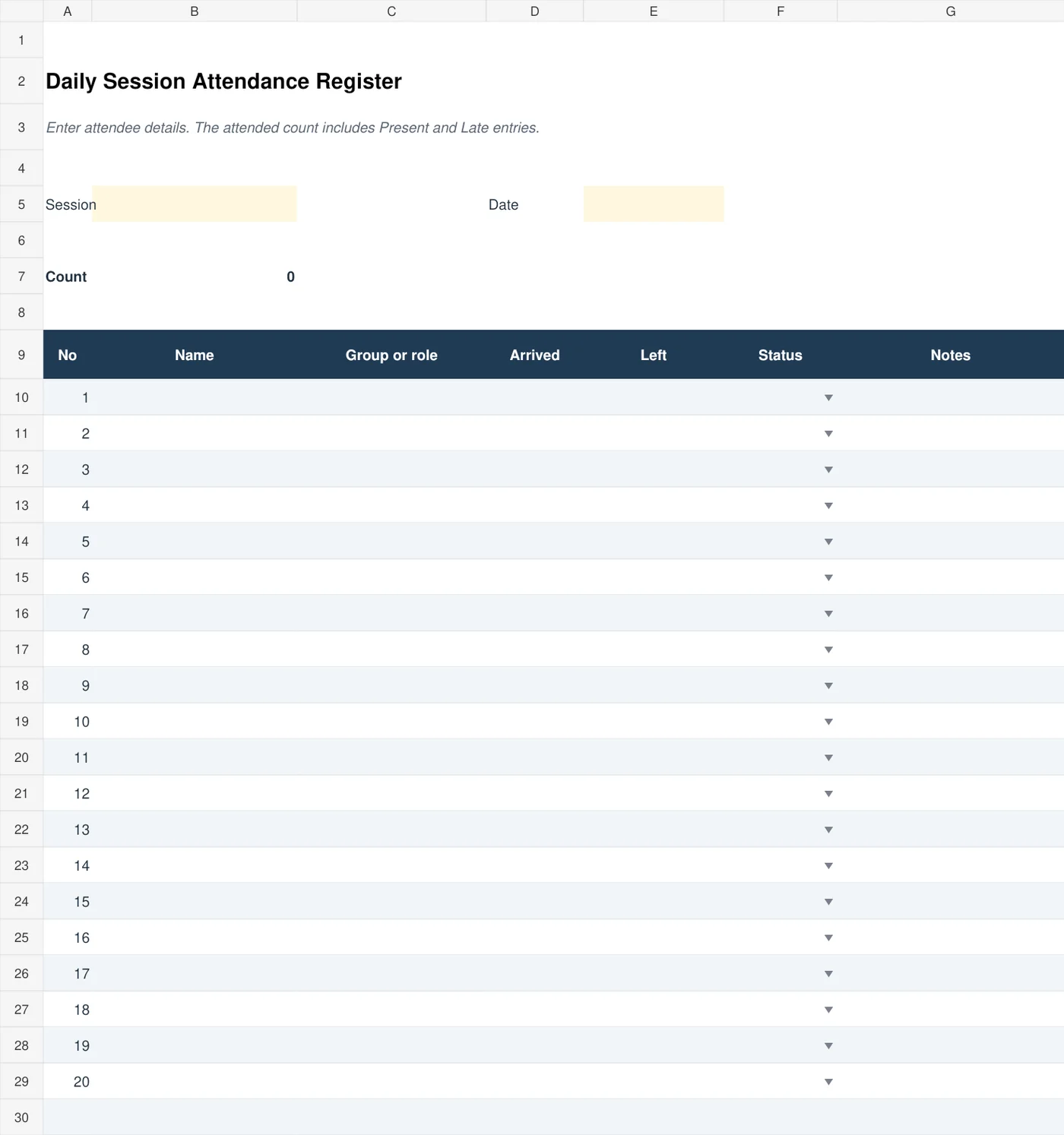
Daily Session Attendance Register
Record attendance for a class, workshop, or meeting, with arrival and departure times and a calculated present count.
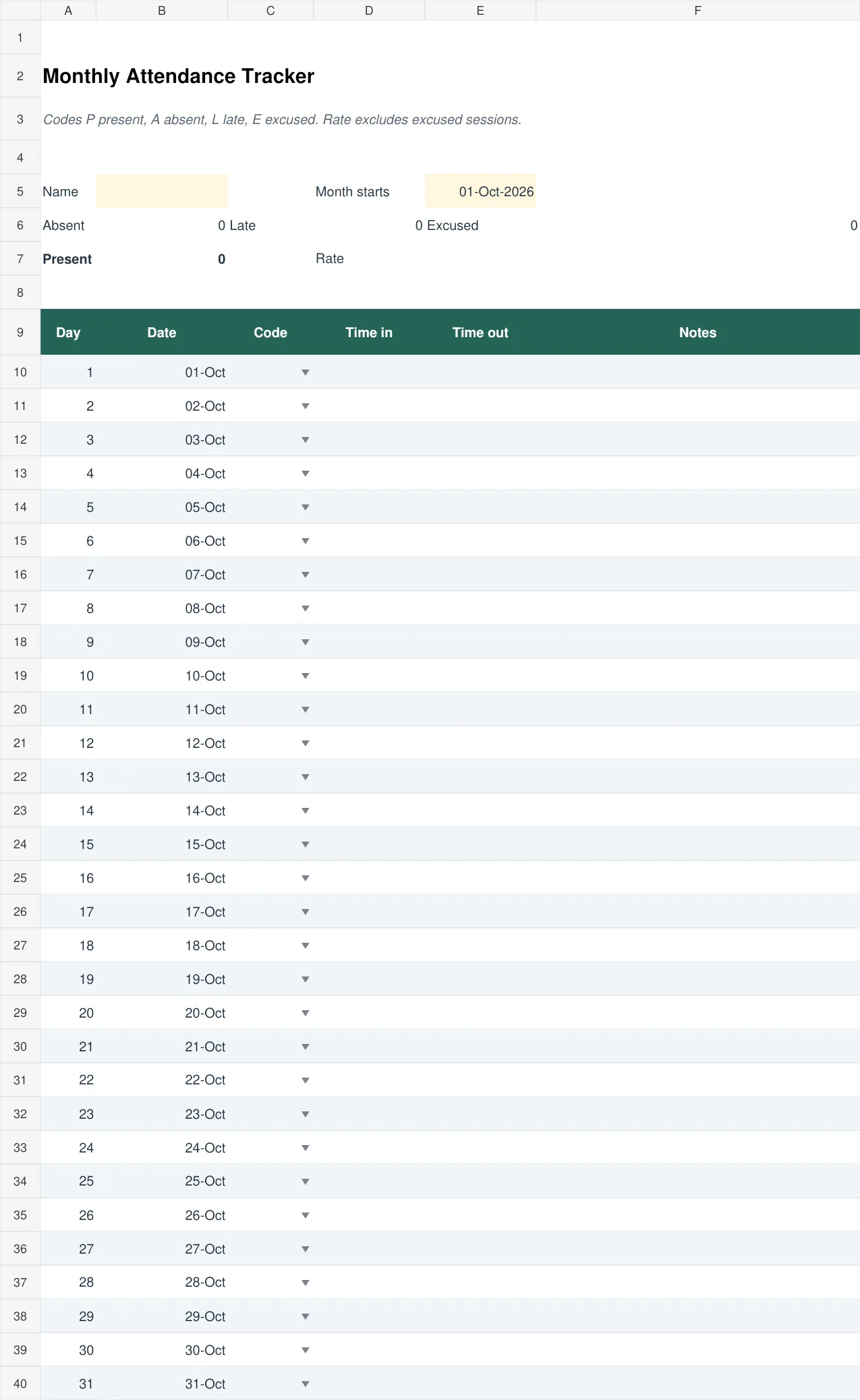
Monthly Attendance Tracker
Track one person’s month with present, absent, late, and excused codes. The form calculates status counts and an attendance percentage that excludes excused sessions.
How to Make an Attendance Sheet in Excel
- Open a blank Excel workbook and type a title such as “Class Attendance – September” in the first row.
- Add column headings: No., Name, and then one column for each date.
- List all names in the Name column and number them.
- Choose a simple code, such as P for present, A for absent and L for late.
- Add a totals column at the end using COUNTIF, for example =COUNTIF(C5:AG5,”P”), to count days present.
- Apply borders and light shading so the table is easy to read.
- Freeze the top row and first columns so the headings stay visible while you scroll.
- Save the file and print a copy if you need a paper version.
Choosing a Register for Sessions, Classes, or Monthly Tracking
A daily attendance register and a monthly attendance tracker answer different questions. A session register helps an organizer see who arrived for one meeting and when they left. A monthly record helps a teacher or supervisor spot patterns for the same person over several dates. Choose the layout around the decision you need to make, rather than selecting the sheet with the most columns. A short workshop rarely needs a month of empty boxes.
The two direct-download Excel files above follow these different approaches. Use the daily session register for a group attending one event. Its status entries distinguish present, absent, late, and excused attendance. Use the monthly tracker for one person’s daily record; duplicate the worksheet if you need a separate record for another person. Enter the month start before marking attendance, then check that the displayed dates belong to the intended month.
A Worked Attendance Example and End-of-Month Checks
Suppose a course has 20 scheduled sessions. One learner attends 16 on time, attends two late, misses one, and has one excused absence. If late attendance counts as attendance and excused sessions are excluded, the calculation is 18 divided by 19, or about 94.7 percent. If your organization uses all scheduled sessions as the denominator, the same record gives 90 percent. Both calculations describe the same entries, but they follow different rules. Write the chosen rule beside the total so a reader can interpret the percentage correctly.
Do not treat an empty cell as an absence automatically. It may mean the session has not taken place, the person was not scheduled, or the register was never completed. Decide how to distinguish these situations before entering data. For a class that meets only on weekdays, leave weekends outside the attendance calculation. For employees working different shifts, check scheduled workdays before comparing their totals.
Before closing the month, reconcile the register with approved leave, cancellations, and any corrected entries. Keep an explanation for a change such as “arrival confirmed by trainer” rather than silently replacing a mark. Store a clean master attendance sheet template separately from completed records, and give each completed file a clear month and group name. This makes it easier to locate the right record without opening several nearly identical spreadsheets.
Tips for Better Attendance Records
- Record attendance at the same time every session so it becomes a habit.
- Use one consistent set of symbols and explain them in a small legend.
- Keep a backup copy of the file, especially for payroll or school records.
- Review the totals weekly or monthly to spot patterns early.
- Protect personal information by storing sheets securely and sharing them only with people who need them.
A clear attendance sheet makes life easier for teachers, managers and event organizers alike. Choose one of these 4 free attendance sheet templates, adjust it to your group, and keep your records accurate and organized all year long.
Frequently Asked Questions (FAQs)
What is an attendance sheet used for?
An attendance sheet records who is present, absent or late at a class, meeting, workplace or event. It supports payroll, academic tracking, safety records and event reporting.
Are these attendance sheet templates free?
Yes. The two editable templates at the top are free to download directly. The editable files are hosted here for direct download.
Can I edit an attendance sheet template in Excel?
Most spreadsheet-style templates can be opened and edited in Excel. You can change names, dates, column widths and colors to match your needs. Some templates are Word documents or printable forms, which you can edit in Word or print and fill in by hand.
How do I calculate attendance percentage?
Divide qualifying attended sessions by the sessions included under your reporting rule, then multiply by 100. For example, 18 attended sessions out of 20 gives 90 percent. State whether late arrivals count as attended and whether excused absences are excluded; use the same rule consistently.
What is the difference between an attendance sheet and a sign-in sheet?
An attendance sheet usually lists expected people in advance and marks each one present or absent. A sign-in sheet is blank at the start, and people write their own names as they arrive. Both can be used together for events.
How long should attendance records be kept?
It depends on your school, employer or local regulations. Many organizations keep records for at least one year, and payroll-related records are often kept longer. Check the rules that apply to you.
Can I use an attendance sheet for online classes or meetings?
Yes. Simply add a column for the join time or mark attendance from the participant list in your video meeting tool, then copy it into the template afterward.
Should a cancelled session count as an absence?
Keep a cancelled session separate from an individual’s absence. Exclude it from scheduled-session totals when that matches your organization’s reporting rule, and label the cancellation so an empty box cannot be mistaken for missing attendance.