
A t-shirt order form should capture exactly what the printer needs without making the customer decode production details. Record the design, garment type, color, size, quantity, and any personalization as separate choices, then show how payment and collection will work.
2 New Editable Templates with Previews
Choose a layout for the task you need to complete. Each preview shows the actual editable Word and Excel file. Download the template and replace the placeholders or example inputs with your own details.
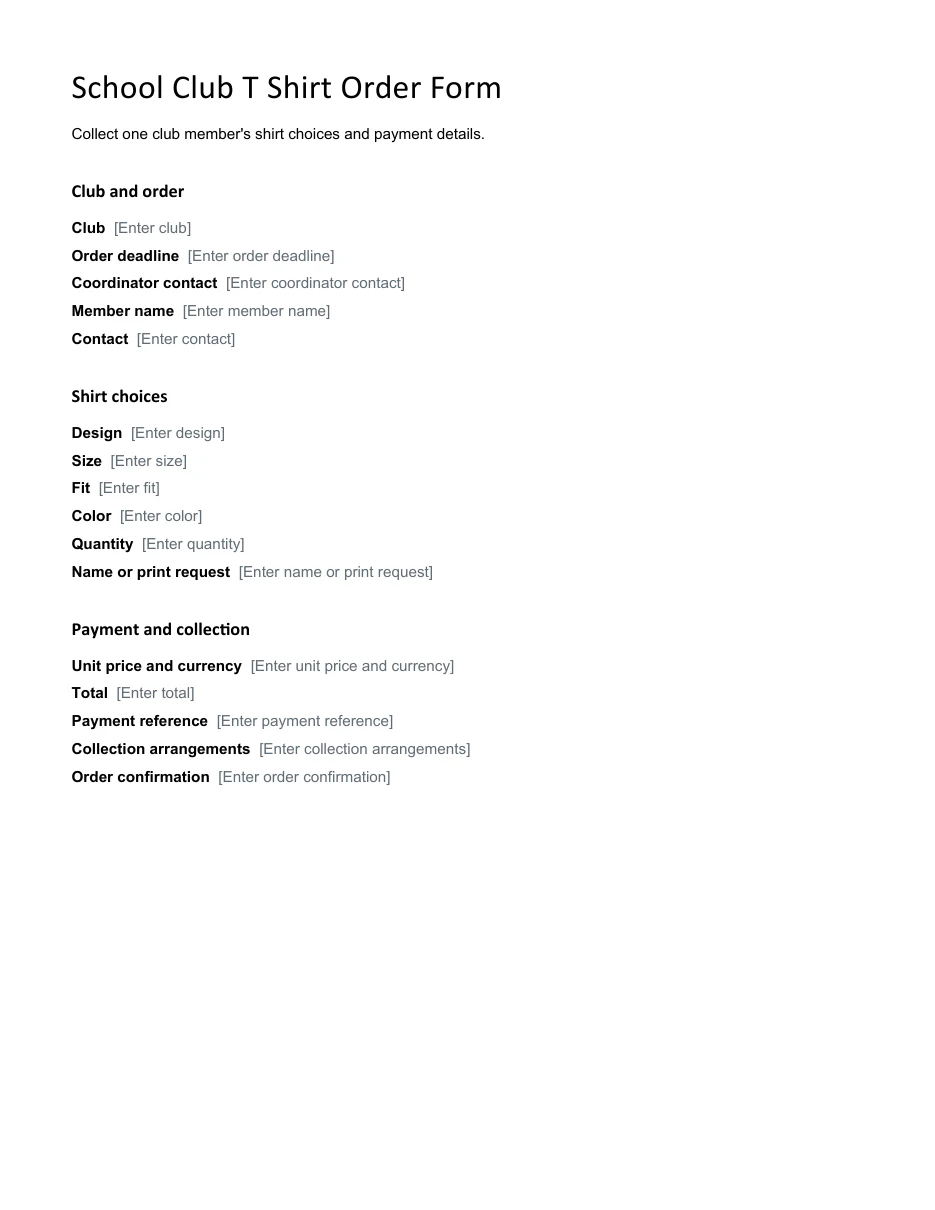
School Club T Shirt Order Form
Collect one club member’s shirt choices and payment details.
Download Editable Word Template
T Shirt Size Totals Order Register
Record shirt orders and calculate line totals for a supplier order.
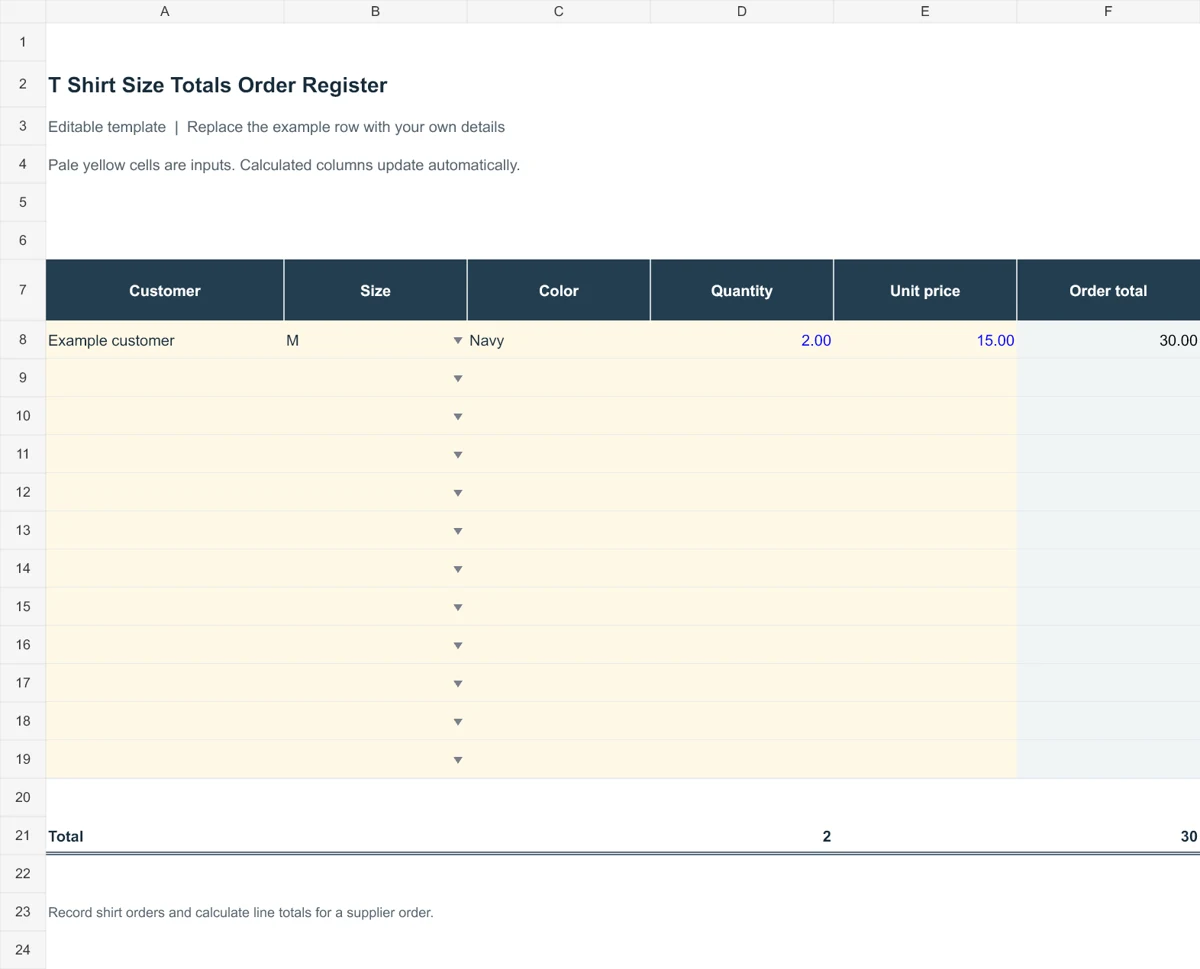
Use the templates below for a school fundraiser, team order, event sale, or small business. Confirm the supplier’s size chart before collecting orders and define how changes will be handled after the deadline. Summarizing quantities by each size-and-color combination helps you compare customer requests with the final production order.
Go to the two editable templates and preview images and read the practical guidance below.
What Is a T-Shirt Order Form?
A t-shirt order form is a document customers fill out to request one or more shirts. It captures the customer’s contact information, the shirt style, size, color, and quantity, and the payment details. Sellers use it to total the order, collect payment, and plan production or delivery.
These forms are used by schools and sports teams, charity events, clubs, family reunions, screen printers, and online stores. They can be handed out on paper, posted online, or sent by email.
Why Use a T-Shirt Order Form Template?
- Saves setup time. A template already has the fields you need.
- Reduces errors. Clear size and color options prevent guessing and wrong orders.
- Makes totals easy. Price and quantity columns help you calculate the amount due.
- Helps with planning. Collected orders show exactly how many of each size to print.
- Works everywhere. Use it at a school table, a booth, or through a website.
When ordering the finished shirts from a supplier, use a purchase order to confirm quantities, sizes, and agreed prices.
What to Include on a T-Shirt Order Form
- Seller or organization name, logo, and contact details
- Customer name, phone number, email, and delivery address
- Shirt style, such as short sleeve, long sleeve, or hoodie
- Color choices and a picture of the design, if possible
- Size options from youth through adult XXL
- Quantity and price per shirt, plus the total
- Payment method and due date
- Order deadline and pickup or delivery information
- Refund or exchange policy
For a larger merchandise sale, a sales order can summarize the accepted order and customer details.
2 Editable Templates with Direct Downloads
Choose one of the two layouts below to suit your needs. Each preview shows the actual editable file, which you can download directly.
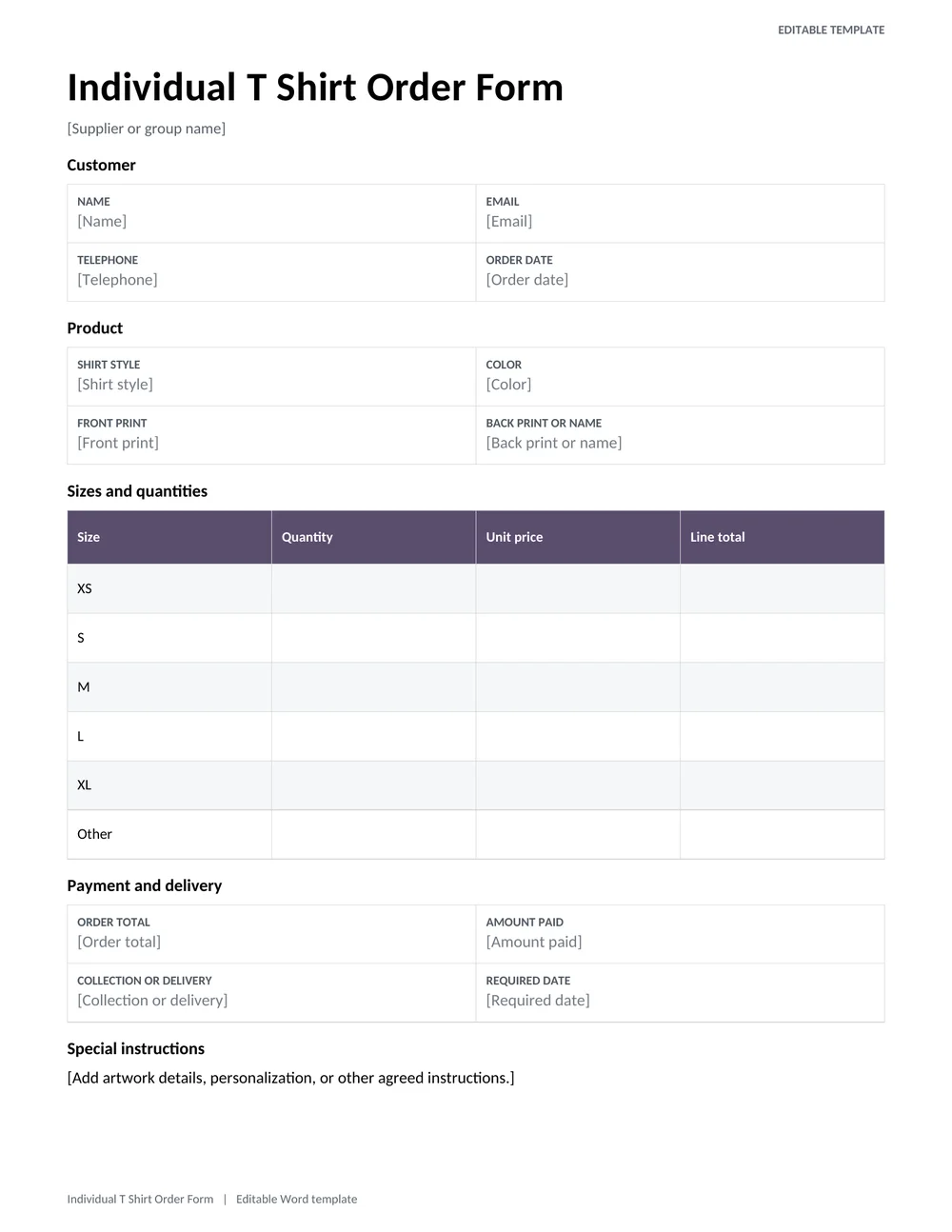
Individual T Shirt Order Form
Collect a customers shirt style, color, size quantities, print instructions, collection choice, and payment details.
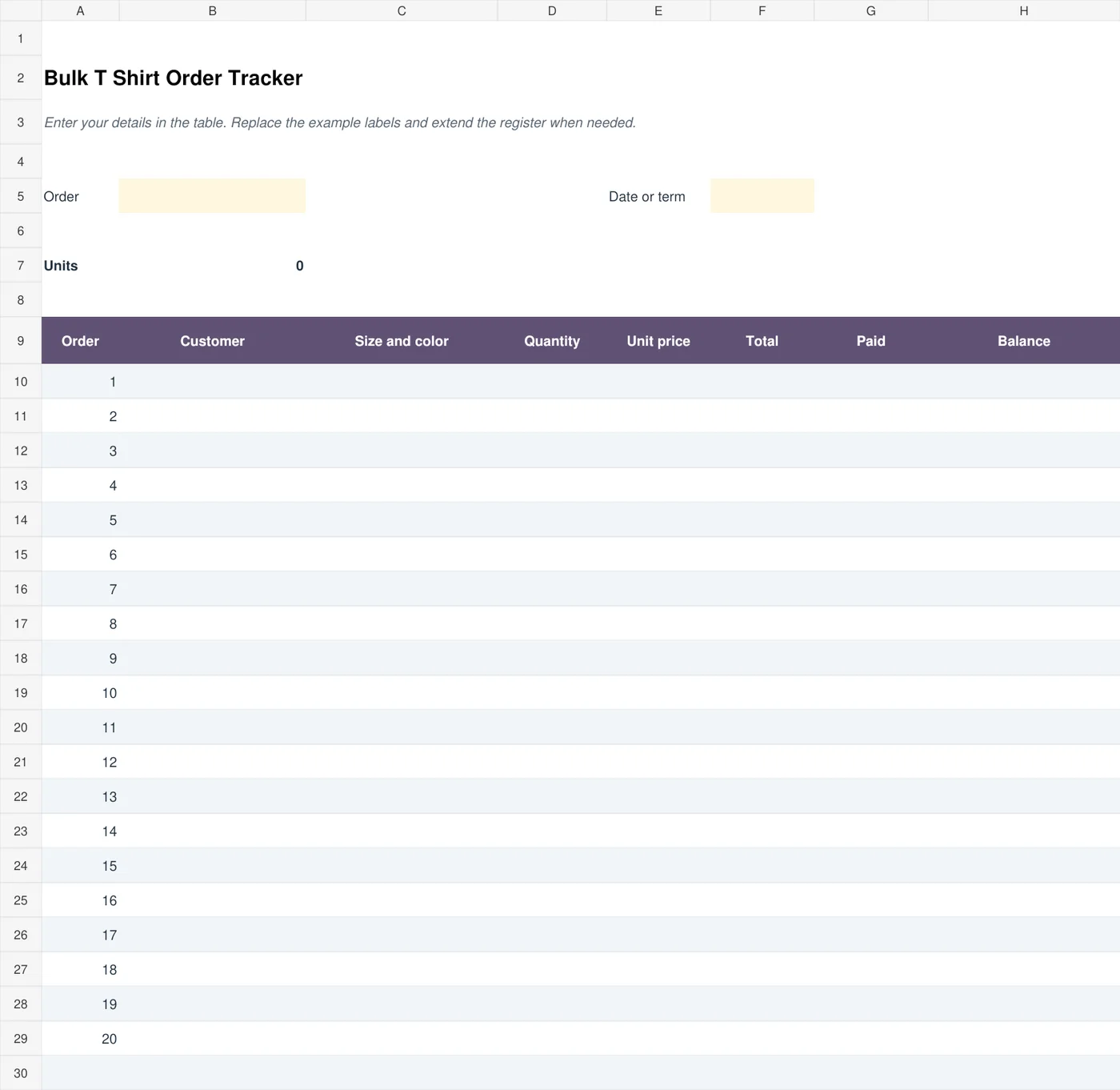
Bulk T Shirt Order Tracker
Track orders from a group, including sizes, quantities, unit prices, payments, and balances due.
Types of T-Shirt Order Forms
- School or team order form: Lists player or student names, numbers, and sizes.
- Fundraiser form: Includes donation amounts and pickup instructions.
- Event order form: Used for races, reunions, and conferences with a set deadline.
- Custom print order form: Lets customers upload artwork and choose print locations.
- Online order form: A web version that captures payment and shipping details.
How to Use a T-Shirt Order Form
- Choose a template that fits your event or business.
- Add your logo, shirt design image, and contact details.
- List the shirt styles, colors, sizes, and prices.
- Set an order deadline and payment method.
- Print copies or share a digital version with customers.
- Collect completed forms and payments.
- Total the sizes and colors before placing your print order.
Give customers payment receipts when collecting money for their shirts.
Separating Customer Choices From Production Instructions
A T-shirt order form serves two audiences: the customer choosing a shirt and the person arranging production. Customers need clear choices, prices, and an ordering deadline. The production team needs an accurate total for each style, size, color, and print option. Start by defining those choices in a consistent way. “Blue medium shirt” may still be ambiguous if several blue fabrics or different shirt cuts are available.
Use a product or design reference when the fundraiser, club, or business offers more than one option. A reference such as TEAM-A can connect a customer order to the approved design proof without repeating every graphic detail on each line. Keep the reference unchanged after orders are collected. If the design changes, issue a revised proof and record whether existing customers need to confirm the change.
The individual order form above is useful for one buyer selecting shirts and providing contact or collection details. The bulk-order workbook combines multiple customer entries and calculates quantities, totals, payments, and balances. Give each order a reference so the paper form, payment record, and collection list can be matched. Sorting the spreadsheet should not change which order belongs to a customer.
Provide the actual size information from the supplier when possible. A label such as medium is not a measurement and can vary between products. Explain whether a size chart describes garment measurements or the wearer’s body measurements. Keep youth sizes separate from adult sizes, and avoid assuming that an adult small can substitute for a youth size without confirmation from the customer.
A Worked Bulk Order and a Production Check
Suppose one customer orders two shirts at 15 each and pays 20 in advance. The order total is 30 and the remaining balance is 10, before any separately agreed charges or discounts. In the bulk tracker, record the quantity, unit price, and payment in their own fields. This lets the totals show how the balance arose instead of placing an unexplained final amount in a notes column.
Use a separate line when the same customer selects shirts with different prices or production specifications. For example, two standard shirts and one personalized shirt may require different unit prices. Combining all three under one line can hide the extra cost and confuse the printer. If a personalization field contains a name or number, reproduce the customer’s approved spelling exactly and ask for confirmation when handwriting is unclear.
Before sending the order to the supplier, group quantities by the combination the supplier needs: product, color, size, and print design. Then reconcile those production totals with the customer order list. If the customer list contains 72 shirts but the supplier summary contains 70, find the difference before approving production. Do not assume the spreadsheet total proves every individual specification is correct.
Track payment status separately from production status. An order can be paid but still awaiting artwork approval, or approved for printing while a balance remains outstanding under the agreed process. Use clear labels for received, confirmed, sent to production, ready, and collected where they are needed. The form should make it possible to answer a customer’s question without guessing from a collection of colored cells.
Set a clear method for changes after the order deadline. If a customer changes a size, update the individual record and the supplier summary together, then confirm whether the change is still possible. Preserve the original reference and note the revision date. A replacement order should not accidentally become an additional order simply because the customer sent a second message.
At handover, check the order reference and the actual items, not just the customer’s name. Record partial collection if a shirt is missing or being reprinted, and identify the person responsible for resolving it. Keep contact information only as long as needed under the organization’s process. A well-managed printable T-shirt order form helps prevent avoidable reprints, duplicate orders, and payment disputes as well as making the initial order easier to place.
Keep a clean master form for the next campaign, but remove prices, deadlines, and supplier options that belong only to the current run. Before reusing it, confirm that the shirt product and size chart are still available. A familiar layout is helpful only when its choices match what can actually be ordered.
Tips for a Better Order Form
- Show a size chart so customers can choose accurately.
- Include a picture of the design and available colors.
- Make the total price easy to calculate.
- Ask for a phone number in case you need to confirm details.
- Keep the form to a single page.
- Give each customer a copy or receipt for their records.
A tidy t-shirt order form keeps your project on schedule and your customers happy. Choose one of the 2 templates above, adapt it with your own logo and options, and start collecting orders. The clearer the form, the fewer the mistakes when the shirts arrive.
Frequently Asked Questions (FAQs)
What is a t-shirt order form?
It is a form customers use to request t-shirts, listing size, color, and quantity along with contact and payment details.
What sizes should I offer?
Most sellers offer youth and adult sizes from small to XL, and often 2XL or 3XL. Include a size chart to help customers choose.
How do I calculate the total?
Multiply the price per shirt by the quantity for each size, then add any shipping or extra fees. Add a totals row on your form to simplify it.
Can I use these forms for a fundraiser?
Yes. Add a line for donations or the amount that goes to your cause, and set a clear deadline.
Should I collect payment upfront?
Many sellers collect payment when the order is placed. This ensures you can cover the printing costs.
Can I make an online t-shirt order form?
Yes. Use these templates as a guide and recreate the fields in an online form builder or on your website.
Are these templates free?
Yes, all templates on this page are free to view and use.
What should I do if the supplier cannot provide a selected size?
Contact the customer before substituting another size or garment. Record the agreed replacement, price difference, or refund decision on the order, and update the production summary so the original selection is not ordered by mistake.
You must be logged in to post a comment.